

The average remote professional now spends 11 hours a week just switching between apps, chasing notifications, and re-explaining context to themselves after every interruption. In other words, that’s nearly a third of a standard workweek lost to friction, not actual work. Consequently, that’s exactly the gap a custom AI productivity workflow is built to close.
Here’s the uncomfortable truth: buying another productivity app won’t fix that. Instead, what fixes it is a deliberate, custom AI productivity workflow — a repeatable system where tools like ChatGPT and Gemini handle the busywork, while you handle the thinking.
In this guide, you’ll learn how to design that system from scratch, which tools belong in it, and why the professionals who stick with it usually have one thing in common: outside accountability, the kind a life coach is trained to provide.
What a Custom AI Productivity Workflow Actually Is
First, it helps to define the term clearly. An AI productivity workflow isn’t a single app. Rather, it’s a connected sequence of tools and habits that moves a task from “in your head” to “done” with minimal manual effort in between.
Most people, however, use AI reactively — asking ChatGPT a question here, drafting an email with Gemini there. Because of this, that’s not really a workflow; it’s just a collection of one-off favors. A true workflow, by contrast, has:
- A consistent entry point for capturing tasks and ideas
- Defined AI handoffs for repetitive work (summarizing, drafting, scheduling)
- Automation bridges that move information between tools without you copying and pasting
- A weekly review loop that keeps the system honest
Consequently, the goal isn’t to use more AI. Instead, it’s to use less willpower per task.
The Core Building Blocks of a Custom AI Productivity Workflow
Overall, building your own system takes less time than most people expect. Below, you’ll find a four-step framework you can implement in a single afternoon.
Step 1: Audit Your Time Sinks
First, before adding any tool, track your actual week. For three days, jot down every task that takes more than five minutes, and note whether it required thinking or just doing. Typically, you’ll find that 40–60% of your day falls into the “doing” bucket — status updates, scheduling, first-draft writing, data formatting. In short, this is exactly the category generative AI tools are built to absorb.
Step 2: Choose Your AI Toolkit
Next, resist the urge to buy ten subscriptions. In fact, most remote professionals only need three categories covered:
- A reasoning assistant (ChatGPT or Gemini) for drafting, summarizing, and analysis
- A scheduling layer that reads your calendar and protects focus blocks
- An automation connector (like Zapier or Make) that links your inbox, calendar, and task manager together
Specifically, resist the urge to add a fourth tool “just in case.” After all, every extra tool is another context switch, and context switches are the exact problem you’re solving for.
Step 3: Build Automation Bridges
This is the step most people skip, and yet it’s the one that actually saves time. For example, instead of manually forwarding meeting notes into a task list, set up an automation that does it for you. Similarly, instead of copy-pasting a client email into ChatGPT for a draft reply, use a browser extension or automation that pulls it in automatically.
However, don’t over-engineer this. Instead, start with one bridge — the single most repetitive handoff in your week — and only add a second once the first runs reliably for two weeks straight.
Step 4: Set Boundaries and Review Weekly
Ultimately, an AI productivity workflow without a review cycle degrades within a month. So, block 20 minutes every Friday to ask three questions: What did the system handle well? Where did I still do manual work I shouldn’t have? What’s one thing to automate next week?
This is precisely where many professionals bring in outside support — not because the tools are hard to use, but because self-accountability is hard to sustain alone.
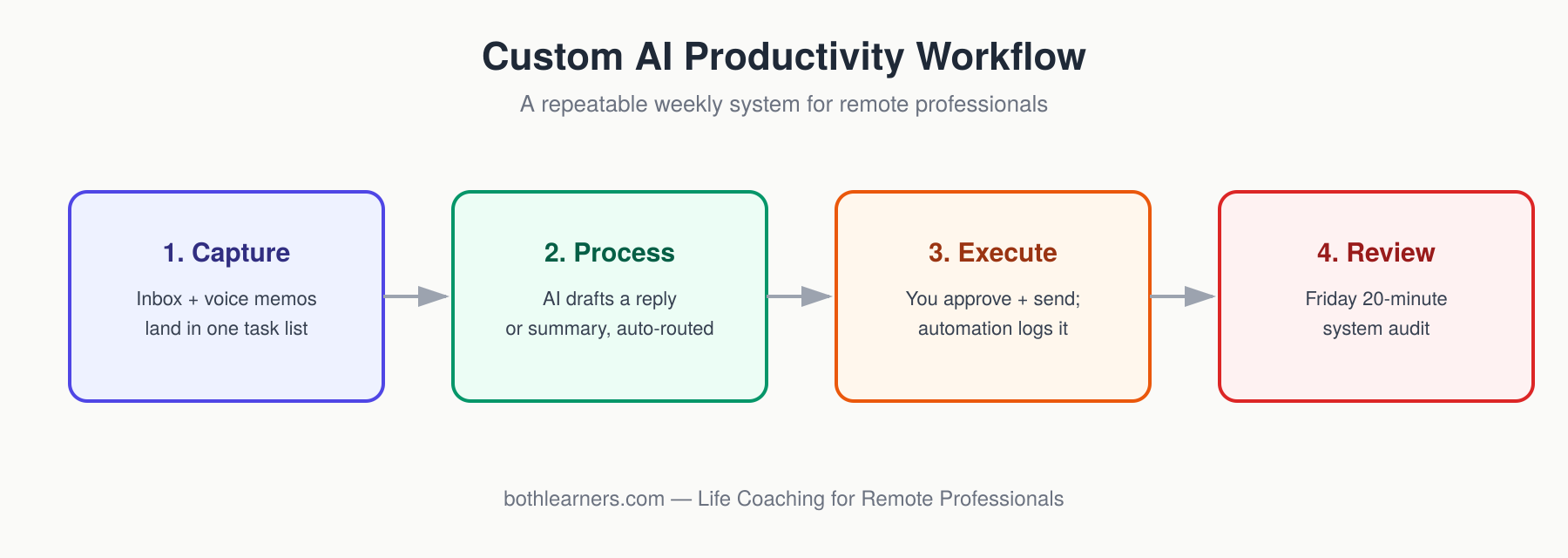
A Sample Custom AI Productivity Workflow, Visualized
Here’s what a functioning weekly workflow can look like, once the building blocks above are in place:
| Stage | What Happens |
|---|---|
| 1. Capture | Inbox and voice memos land in one task list |
| 2. Process | AI drafts a reply or summary and auto-routes it by priority |
| 3. Execute | You approve or edit, then send; automation logs completion |
| 4. Review | Friday 20-minute system audit |
For comparison, here’s how that same week looks in terms of time saved:
| Task Type | Manual Time (Before) | AI-Assisted Time (After) | Tool Used |
|---|---|---|---|
| Meeting notes → action items | 25 min | 4 min | ChatGPT/Gemini + automation |
| First-draft client emails | 15 min | 3 min | Generative AI tools |
| Weekly status report | 40 min | 8 min | AI summary + template |
| Calendar reshuffling | 20 min | 2 min | Scheduling automation |
Added up across a week, this typically reclaims 6–10 hours — time that, in turn, goes back into deep work, client relationships, or, just as importantly, rest.
Why a Life Coach Makes Your Custom AI Productivity Workflow Stick
Setting up the tools is the easy part. The harder part, though, is sustaining the new habits, which is exactly where most self-built systems quietly fall apart around week three. To be clear, a life coach doesn’t replace your AI workflow — instead, they act as the human review layer that most solo automations lack. For instance, they help you notice when “saved time” quietly gets refilled with more work instead of the boundaries you actually wanted, and they keep the weekly review honest when motivation dips.
If you’re exploring how coaching support pairs with time management automation, this is often where structured accountability outperforms another productivity app. So, see our life coaching program for remote professionals. Additionally, it’s worth reviewing our 1:1 coaching packages if you want a guided version of the audit in Step 1 above.
Common Mistakes That Sabotage a Custom AI Productivity Workflow
Even well-intentioned professionals, however, derail their own workflow. Specifically, watch for these patterns:
- Automating a broken process. If a task is inefficient, automating it just makes the inefficiency faster.
- Skipping the weekly review. As a result, the system silently drifts back to manual habits within a month.
- Tool-hopping. After all, switching AI platforms every few weeks resets your prompt history and learned context.
- Treating AI as a replacement for judgment. Instead, use it to draft and summarize, not to make final calls on nuanced work.
For a broader look at how organizations are adapting their operating models, McKinsey & Company’s ongoing future-of-work research is a useful reference point. Similarly, Harvard Business Review’s coverage of AI and time management explores how structured adoption, rather than tool volume, tends to separate the professionals who sustain new habits from those who abandon them within a month.
Key Takeaways & Your Next Step
Ultimately, building a genuine custom AI productivity workflow isn’t about downloading more apps. Instead, it’s about designing one connected system: capture, AI-assisted processing, execution, and a weekly review. So, start with a single automation bridge, track the time it saves, and then expand from there.
If you’d rather not build this alone, that’s exactly what coaching is for. Book a free workflow audit call, and leave with a personalized AI productivity system mapped out for your exact role and workload.

Bilal Khan
Dual professionally qualified Chartered Accountant, academic mentor to 500+ students worldwide, life coach, and entrepreneur. Passionate about helping individuals grow professionally, academically, and personally.
